
Guides · Hosting a server · Guide 5.2
Ports and firewalls
Players reach each of your servers on its own UDP port: 18300 for the first, 18301 for the next, and on.
| PORT | FOR | WHO OPENS IT |
|---|---|---|
| UDP 18300, 18301 and on | Your servers, one port each: players join here | Every host |
| TCP 18241, 18246, 18250 | A backend: login and the server list | Only when your servers run their own backend (LAN only) and players join them from the internet by address |
| TCP 18290 new in 0.4.8 | Your community page, if you turn it on | Only if players outside your home should open it (see Dashboard and community page) |
Behind a home router
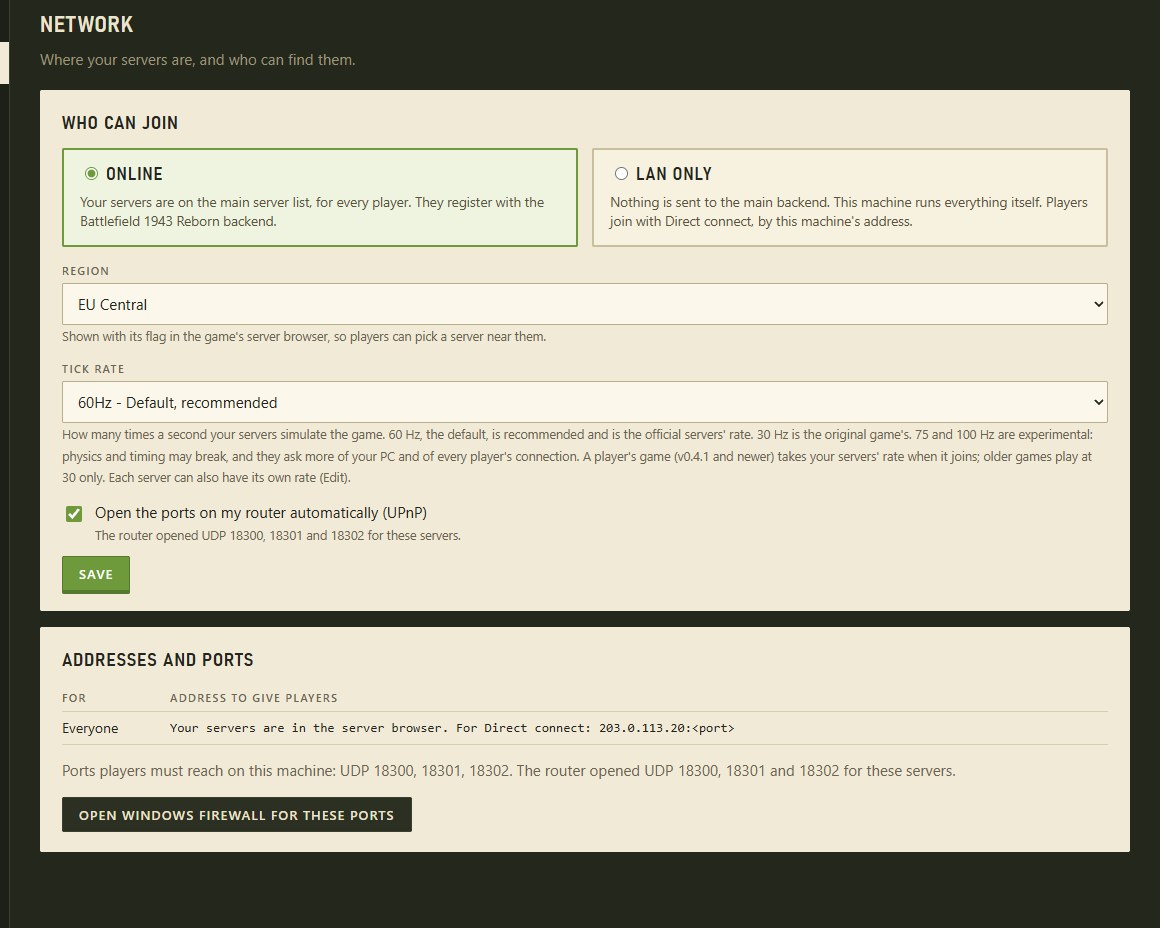
The manager asks your router to open your servers' ports itself (UPnP). If the router does not allow it, the Network page says which ports to open by hand: forward each UDP port to this PC in your router's settings.
On a hosted server
Run Open firewall ports.bat once, or use Open Windows Firewall for these ports on the Network page, then open the same UDP ports in your host's own firewall panel. On a Linux host, open them in its firewall too (for example ufw allow 18300:18303/udp for four servers).
Checking it works
On Servers, a server players can reach says so under its name. Ask a friend to find it in the Server Browser, under Community.